Every connection asks first.

NetSentinel shows every app talking to the internet, checks who it is talking to, and lets you allow or block it in one click. Free and open source for Windows, with an optional hub that watches all your PCs from one page, for one team or for many customers.

FreeOpen sourceNo accountWindows 10 / 11
New connectionExample
chrome.exe
203.0.113.42:443
Google LLC, signed. Seen daily.

What's new

Version 1.5 gives every PC its own page in the hub. Version 1.4 turned the hub into a service for many customers. Both came from running NetSentinel on real lab and office PCs.

1.5October 2026
Latest
  • Usage monitor for every PCSee which apps sent and received the most data on a PC, over 24 hours, 7 days or 30 days.
  • Firewall view for every PCIs Windows Firewall on, and which apps are allowed or blocked. Change a rule from the hub when the PC allows control.
  • Alerts & logs for every PCJust the alerts, or everything the PC reported, with search and a type filter.
  • Acknowledge clears the PC tooThe notification disappears on the PC. With hub control on it is also accepted as normal, like Accept and Accept all there.
  • Reset an admin's passwordThe operator resets a customer admin's password, can restore admin rights or switch two-factor off, and it is audited.
  • An honest status lightOn shared hosting the dashboard says Auto-refresh instead of sitting on "Reconnecting".
1.4October 2026
  • OrganizationsOne hub, many customers. Each organization has its own administrators, viewers, PCs, tokens, notifications and audit log, and can never see another's.
  • Plans and limitsSet a PC limit, an end date with a 7-day grace period, and which features each customer gets. Suspending never deletes anything.
  • Their own VirusTotal keyEach organization adds its own key. It is checked before it is kept, only its last four characters are ever shown, and yours is never used for them.
  • Operator viewOpen any organization the way its admin sees it, to help. Every visit is written to that organization's audit log.
1.3October 2026
  • Installer and uninstallerOne Setup file adds NetSentinel to Apps & features. Uninstall can also erase your keys, settings, history and the firewall rules it created.
  • Signed buildsThe build script signs the app, the installer and the uninstaller when you provide a certificate.
  • Opens full screenThe window fills your screen. F11 switches to true full screen, Esc brings it back.
  • Calmer SettingsSections fold away and only one stays open, with larger headings so you find things faster.
  • Hub on shared hostingRun the hub on a normal cPanel account with Setup Python App. A step-by-step guide is included.
1.2October 2026
  • Acknowledge alertsAcknowledge one alert or all of them. The hub tells each PC, which silences its pop-ups and reminders.
  • Several adminsAdd people as administrators or read-only viewers, each with a password and two-factor login.
  • Email and webhook alertsSend alerts to email, Slack, Discord, Telegram or any URL, with batching so one bad night is not 400 messages.
  • Network discovery in the hubSee the devices found on every PC's network, merged, with new-device flags and a Scan now button.
  • Lighter on your PCLess CPU and memory, and almost nothing when the window is hidden in the tray.
  • Brute-force protectionRepeated wrong sign-ins lock out the address, then the account, and the lockout survives a restart.
1.0Remote edition
  • Self-hosted hubPCs report to your own server over outbound HTTPS. No port opens on any PC.
  • Signed remote actionsTerminate a process or block an app from the hub, only on PCs whose owner switched control on.
  • One VirusTotal budgetThe hub shares one key across the fleet and caches answers.

See it. Decide it. Move on.

The parts you use every day, without a wall of settings.

Real-time mode (beta)

Hold a connection until you answer

Windows Firewall only blocks things you already know about. In real-time mode, a first-time connection waits for your decision before any data leaves, so Block really means blocked.

Allow onceAlways allowBlockRemember per app
Traffic

Who is using your bandwidth

A live graph with per-app download and upload.

Reputation

VirusTotal built in

New programs and new remote addresses are checked with your own free API key. The key lives in the Windows credential store.

Places

A map of where it goes

Every remote address placed on a world map, with country and network owner, so odd destinations stand out.

Security

Spots the quiet stuff

Gateway spoofing on the LAN, suspicious Wi-Fi changes, new startup items and crashes, each with a clear next step.

Alerts

Hear about it where you already are

Pop-ups on the PC, and from the hub to your phone or team chat.

EmailSlackDiscordTelegramWebhook
Your data

Nothing leaves without you

No account and no cloud. History stays on your PC, or on your own hub. The only outside lookups are the optional VirusTotal checks you turn on.

In action: alerts

Trouble is impossible to miss

When something is wrong, such as another device pretending to be your router, NetSentinel tells you loudly. Act on it, or acknowledge it. On the hub, one Acknowledge quiets the pop-ups on every PC.

  • Gateway spoofing and Wi-Fi look-alikes
  • New startup items and crashes
  • Sticky pop-ups until you acknowledge
SecurityAll clear
Gateway address matches
Wi-Fi network unchanged
No new startup items
Gateway 192.168.1.1 changed hardware addressAnother device is answering as your router. This can mean ARP spoofing. Example alert.
Office PC acknowledgedLab PC acknowledgedLaptop acknowledged
NetSentinel scanExample
0 / 70
MALICIOUS
explorer.exeparent
invoice_2891.exePID 4128
203.0.113.77:4444outbound connection
In action: malware

Flagged by VirusTotal. Stopped in seconds.

New programs are looked up on VirusTotal with your own key. When enough engines call a file malicious, NetSentinel can end the process, cut its connection and block the app, on this PC or from the hub.

  • You choose how many engines count as malicious
  • Windows system programs are never terminated
  • If the file changed since the lookup, it is left alone
In action: your network

Notices the stranger on your Wi-Fi

Network discovery sweeps your network and keeps a list of every device it finds. Anything new is flagged until you say it belongs. With the hub, you see the devices from every PC's network in one list.

A firewall you can read

Dark or light, one window, and every screen answers one question.

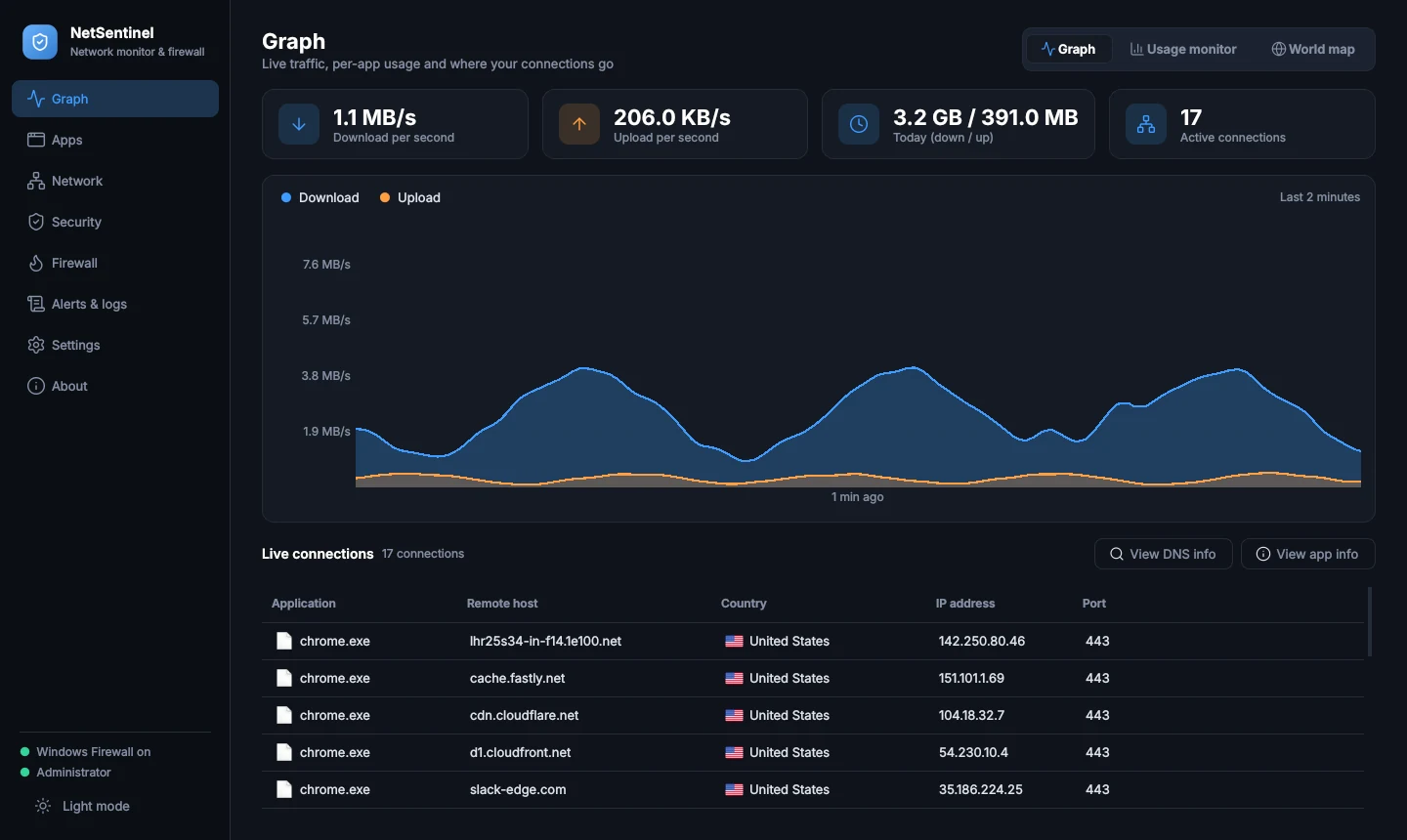
NetSentinel traffic graph

Live traffic with download and upload per app. Click any app to see who it talks to.

One page for every PC

Run the hub on a small server or a normal web host. Each PC reports to it, and you review alerts, scan results and devices in one place.

  • Outbound only. PCs call the hub over HTTPS. Nothing listens on your PCs, and no router changes are needed.
  • Signed and expiring. Every command carries a signature and expires in five minutes. Control is off until the PC owner turns it on.
  • Roles and 2FA. Administrators act, viewers watch. Everyone signs in with a password and an authenticator code.
Office PCalerts, scans Lab PCalerts, devices Laptopalerts, scans Your hubhub.yourdomain.comHTTPS, 2FA, audit log outbound HTTPS only signed command, expires in 5:00

Open any PC. See what it is doing.

Every machine gets its own page in the hub: what its apps are sending, which firewall rules it has, and everything it reported. Acknowledge an alert and the pop-up clears on the PC too.

reception-pconlineWindows 11 · v1.5 · hub control on
Powered byWebtonixWebtonix

On the PC

What the person at the desk sees.

Cleared on the PC too. It stops nagging.

One hub. Many customers.

Run NetSentinel as a service. You are the operator: create an organization for each customer, and they manage their own PCs. Nobody can see anyone else's.

  • Separate by design. Each organization has its own administrators, viewers, PCs, enrollment tokens, notifications and audit log.
  • Their own VirusTotal key. Each customer pastes their own, so lookups and daily limits are theirs alone. Yours is never used for them.
  • Plans you control. A PC limit, an end date with a 7-day grace period, and which features they get. Suspending never deletes data.
  • Support without risk. Reset a customer admin's password or open their view to help. Every visit is recorded in their audit log.

Get your organization on the hub

You, the operatorsees every organization
Press a button to see what the operator does.

Running in about two minutes

Windows 10 or 11. Run it as Administrator so it can manage firewall rules.

Install

Download the Setup file and run it. NetSentinel appears in the Start menu and in Apps & features.

Add a VirusTotal key

Optional. Paste a free key in Settings and new programs get checked automatically.

Connect a hub

Optional. In Settings, Remote monitoring, enter your hub address and a token from the hub dashboard.

Download for Windows Version 1.5Setup .exe

Questions

Is it really free?

On your own PC, yes. NetSentinel is free and open source with no account. VirusTotal checks use your own free API key, which has its own daily limits. A company that wants a managed hub for its PCs can ask Webtonix to set one up.

Does it replace Windows Firewall?

No. It works with it. Allow and block decisions become Windows Firewall rules. The optional real-time mode adds a driver that holds a first-time connection until you answer.

Windows says "unknown publisher". Is that normal?

Until a build is signed with a code-signing certificate, Windows shows that warning for any new program. The build script signs the app, installer and uninstaller once you provide a certificate.

Do I need the hub?

No. NetSentinel works on a single PC by itself. The hub is for people who look after several PCs, such as a lab, a classroom or a small office.

Can I run the hub on ordinary web hosting?

Yes, on a cPanel account that has Setup Python App. Alerts and commands reach the PCs within about ten seconds there. A small VPS gives instant updates.

Can one hub serve several companies?

Yes. The hub operator creates an organization for each customer. Each one gets its own administrators, PCs, enrollment tokens, notifications and VirusTotal key, and cannot see anyone else's data. To have your organization added, contact Webtonix.

What can I see for each PC in the hub?

Open a PC for four tabs: Overview, Usage monitor, Firewall, and Alerts & logs. The usage numbers need per-app usage switched on at the PC, which needs Administrator rights, and they arrive about two minutes after the PC connects.

If I acknowledge an alert in the hub, does it go away on the PC?

Yes, the pop-up and its reminders clear on the PC. If that PC's owner allows hub control, the item is also accepted as normal, exactly like pressing Accept or Accept all there. Without hub control, the PC only stops the pop-ups.

Does it terminate flagged files by itself?

A file is flagged when at least 3 VirusTotal engines call it malicious. You can change that number. By default NetSentinel blocks the file with a firewall rule and tells you, and the alert reaches the hub. Automatic termination is a setting that is off until you switch it on.

How do I remove it completely?

Uninstall it from Apps & features and choose to erase its data. That removes the saved keys, settings, history and the firewall rules NetSentinel created.