Every connection asks first.
See every app that talks to the internet, find out who it is talking to, and allow or block it in one click. NetSentinel is a free, open-source firewall and network monitor for Windows. Looking after several PCs? Add the optional hub and watch them all from one page.
Watch the 3-minute overview
From the first connection prompt to the hub: apps, bandwidth, the world map, VirusTotal, network discovery, ARP spoofing, evil twin Wi-Fi and startup protection.
See it. Decide it. Move on.
Everything you need to stay in control of your PC's connections, without a wall of settings.
Hold a connection until you answer
Windows Firewall only blocks what it already knows about. In real-time mode, a first-time connection waits for your decision before any data leaves, so Block really means blocked.
Who is using your bandwidth
A live graph with per-app download and upload.
VirusTotal built in
New programs and remote addresses are checked against VirusTotal with your own free API key, which is kept safely in the Windows credential store.
A map of where it goes
Every remote address placed on a world map, with country and network owner, so odd destinations stand out.
Spots the quiet stuff
Gateway spoofing on the LAN, suspicious Wi-Fi changes, new startup items and crashes, each with a clear next step.
Hear about it where you already are
Pop-ups on your PC and, with the hub, alerts to your phone or team chat.
Your activity stays yours
No account and no cloud. Your history stays on your PC, or on your own hub. NetSentinel sends only a tiny anonymous install count once a day, and VirusTotal lookups happen only if you turn them on.
Trouble is impossible to miss
When something is wrong, like another device pretending to be your router, NetSentinel tells you straight away. Fix it, or acknowledge it once you have seen it. With the hub, one Acknowledge quiets the pop-ups on every PC.
- Gateway spoofing and Wi-Fi look-alikes
- New startup items and crashes
- Pop-ups stay until you acknowledge them
Flagged by VirusTotal. Stopped in seconds.
New programs are checked on VirusTotal. When enough engines flag a file as malicious, NetSentinel can end the process, cut its connection and block the app, on your PC or from the hub.
- You choose how many engines count as malicious
- Automatic termination stays off until you turn it on
- Commands sent from the hub never touch Windows system files or NetSentinel itself
Notices the stranger on your Wi-Fi
Network discovery sweeps your network and lists every device it finds. Anything new is flagged until you say it belongs, so a stranger on your Wi-Fi does not go unnoticed. With the hub, you see the devices from every PC's network in one list.
A firewall you can read
Dark or light, one window, and every screen answers one question. Screens are NetSentinel Remote 1.6.0 with demo data.
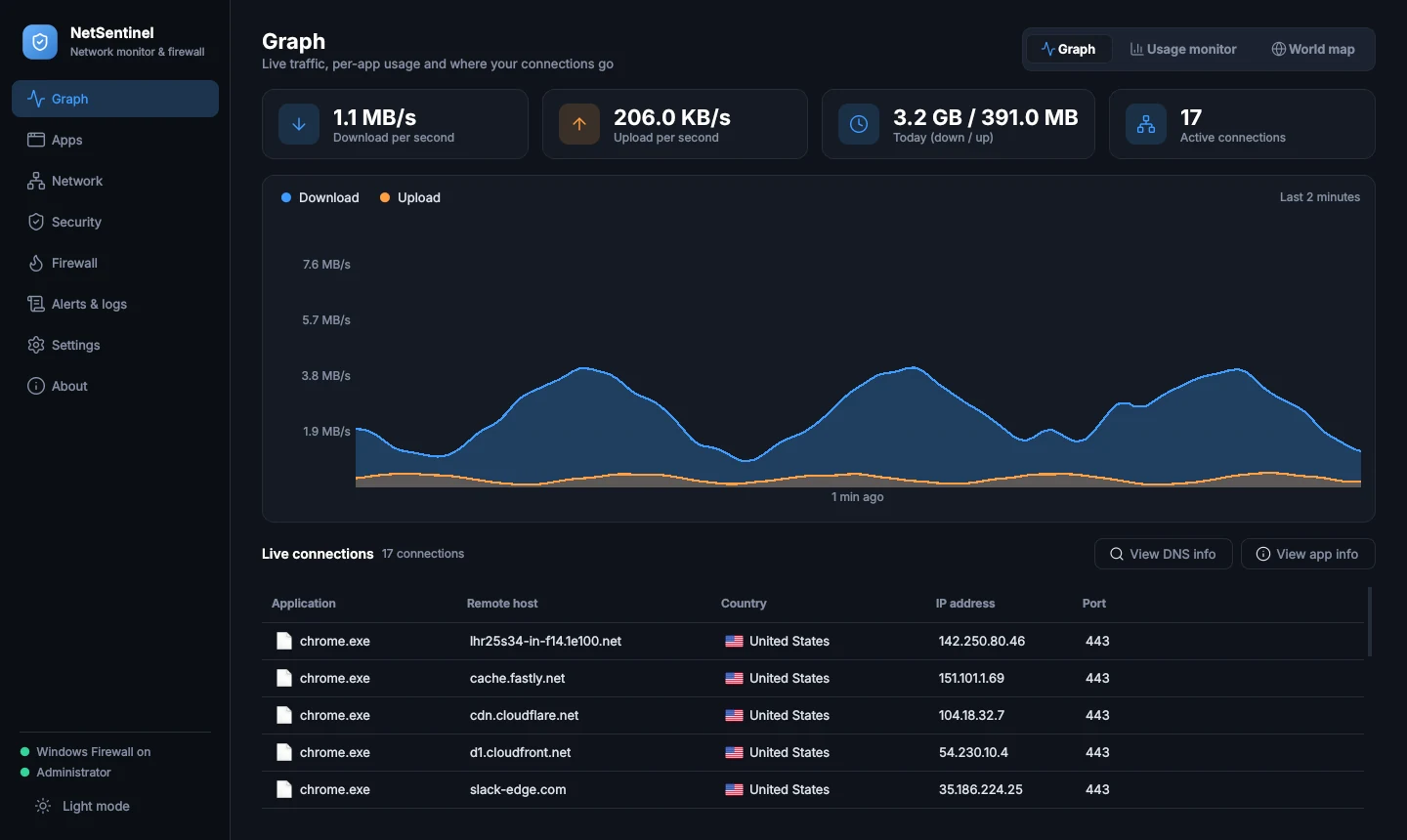
Live traffic with download and upload per app. Click any app to see who it talks to.
One page for every PC
Looking after a lab, a classroom or a small office? The optional hub shows all your PCs in one place: alerts, scan results and devices. Run it on a small server or ordinary web hosting.
- Outbound only. PCs call the hub over HTTPS. Nothing listens on your PCs, and no router changes are needed.
- Signed and expiring. Every command carries a signature and expires in five minutes. Control is off until the PC owner turns it on.
- Roles and 2FA. Administrators act, viewers watch. Everyone signs in with a password and an authenticator code.
Open any PC. See what it is doing.
Every PC gets its own page in the hub: which apps are using the network, which firewall rules apply, and everything it has reported. Acknowledge an alert and the pop-up clears on that PC too.


On the PC
What the person at the desk sees.
Looking after several customers?
One hub can serve many companies or departments. Each gets its own space for its PCs, people and alerts, and nobody can see anyone else's.
- Separate by design. Every organization has its own administrators, viewers, PCs, notifications and audit log.
- Their own VirusTotal key. Each organization uses its own key, so lookups and daily limits are theirs alone.
- Plans and limits. Set a PC limit, an end date with a 7-day grace period, and which features each organization gets. Suspending never deletes data.
- Help without risk. Support can reset an administrator's password or view an organization to help, and every visit is recorded in that organization's audit log.
How it compares
GlassWire is the polished, mostly paid option and Windows Firewall is the built-in baseline. Here is where NetSentinel fits, including where it is behind.
| Feature | NetSentinel | GlassWire | Windows Firewall |
|---|---|---|---|
| Basics | |||
| Price | Free | Free personal plan; premium features are paid | Free, built in |
| Open source | Yes, code on GitHub | No | No |
| Asks before a new connection | Yes, optional real-time mode | Yes, "Ask to connect" is a paid feature | Mostly no. Inbound prompts only; outbound is allowed by default |
| Network discovery | |||
| Finds devices on your LAN | Yes. Sweeps your subnet (ARP and ping) and lists IP, host name, MAC, manufacturer and role (router, this PC, device) | Yes. Network Scanner tab lists devices with manufacturer, IP and MAC | No |
| New-device alerts | Yes. Remembers every MAC it has seen, flags new ones, "Mark as known" with one click | Yes, notifies when a new unknown device joins (Settings, Security) | No |
| Probe a device | Port-scan any selected device from the same screen | Not documented | No |
| Idle monitoring | |||
| Activity while you are away | Yes. Idle monitor records which apps used the network while you were away (default 10 minutes idle) and shows a summary when you return | Yes. Idle mode on the graph plus a "While You Were Away" summary | No |
| ARP spoofing | |||
| Detects it | Yes. Alerts when the gateway's MAC changes or another host claims the gateway's MAC | Yes. Reports ARP spoofing. Security alerts are mostly paid: GlassWire staff say only a couple are free | No |
| Log shows who | Yes. Logs the gateway IP, the old and the new MAC, and the IP of any other host using that MAC. Alerts and logs keep the history | Not documented. GlassWire says it "looks for and reports" ARP spoofing without saying what the report contains | No |
| Fix it | One-click Pin gateway (static ARP entry) and Restore gateway MAC from the alert | Not documented | No |
| Evil twin Wi-Fi | |||
| Detects it | Yes. Flags an open copy of a secured name, look-alike names with extra or hidden characters, unknown manufacturers and much stronger signals. Disconnect in one click | Yes. "Know when a new WiFi access point appears with your current access point's name". Security alerts are mostly paid | No |
| VirusTotal | |||
| Checks files | Yes. New programs that use the network are looked up on VirusTotal with your own key | Yes. Manual analysis or automatic analysis of apps with network activity, with your own key | No |
| Acts when enough engines flag it | Yes. At 3 or more malicious verdicts (you can change the number) it blocks the app with a firewall rule. An optional switch also ends the running process | Alerts you with the scan result. Blocking or ending the process is not documented as automatic | No |
| Hub and remote monitoring | |||
| Several PCs, one place | Yes. Optional self-hosted hub (cPanel or a small VPS). Each PC makes one outbound connection, so no port is opened on it | Yes. Run GlassWire on every remote PC and add it by name and IP in the Server List | Managed with Group Policy or Intune, not a live alert dashboard |
| What the hub shows | Live dashboard, per-PC Overview, Usage monitor, Firewall and Alerts and logs, merged network devices with new-device flags, scan log of every file check, fleet-wide VirusTotal budget | Remote PCs' traffic in the GlassWire graph | Not applicable |
| What you can do from it | Terminate a malicious process, allow or block an app, or block it on all PCs. Off unless the PC owner switches "Let the hub control this PC" on. Acknowledge alerts and the PC's pop-ups clear | View only | No |
| Alerts and access | Email, Slack, Discord, Telegram or signed webhook; administrators and read-only viewers; two-factor login; audit log; separate organizations | Not documented | No |
| Where NetSentinel is weaker | It is a newer project with a smaller community and less polish. It is Windows 10 / 11 only. The installer is not code-signed yet, so Windows may show "unknown publisher". Wi-Fi checks read what Windows already knows, so they cannot see deauthentication floods or a perfect clone of an access point's address. ARP checks watch the ARP cache, so they can miss an attack that never changes it. The hub needs you to host and secure it. | ||
Startup and persistence, in detail
GlassWire's published guide describes alerts for a new app using the network, not a scan of the places Windows starts programs from, so those rows say "Not documented". Windows Firewall is not designed to do this.
| Location | NetSentinel | GlassWire | Windows Firewall |
|---|---|---|---|
| Startup folders (user and all users) | Watched. New or changed shortcuts and files are logged with their path | Not documented | No |
| Run keys in HKCU | Watched. HKCU\...\Run and RunOnce | Not documented | No |
| Run keys in HKLM | Watched. HKLM\...\Run and RunOnce, the 32-bit WOW6432Node copy and Policies\Explorer\Run | Not documented | No |
| Scheduled tasks | Watched. Task name, command and arguments | Not documented | No |
| WMI event subscriptions | Watched. Always rated high severity, because normal software rarely uses them | Not documented | No |
| Services | Watched. Auto-start services and their image path | Not documented | No |
| Other hiding places | Watched. Winlogon (Userinit, Shell, Taskman), IFEO debugger and SilentProcessExit, AppInit_DLLs, Active Setup, logon scripts, screensavers, boot execute, COM overrides | Not documented | No |
| How it judges an entry | Compares with a saved baseline: reports anything new or changed. Flags launches from temp or public folders, encoded PowerShell, mshta, certutil downloads and URLs as suspicious, and scripts or user-writable paths as worth a look | Alerts on "First Network Activity" when a new app first uses the network. That is about network use, not where the app starts from | No equivalent |
| What you see and keep | Status, type, name, command, location (such as HKCU\...\Run or Task Scheduler) and a reason, in the Security page and in Alerts and logs, and sent to the hub. Read only: it never removes anything. Accept or Accept all updates the baseline | App activity in the graph and alerts | No equivalent |
Compared in October 2026 using GlassWire's published user guide and a GlassWire forum thread where staff say only a couple of security alerts are free. "Not documented" means GlassWire's own pages do not say, not that it cannot do it. Features and prices change, so check each vendor before you decide. For Windows Firewall this compares outbound control and monitoring; its inbound protection is solid.
Running in about two minutes
Windows 10 or 11. Run it as Administrator so it can manage firewall rules.
Install
Download the Setup file and run it. NetSentinel appears in the Start menu and in Apps & features.
Add a VirusTotal key
Optional. Paste a free key in Settings and new programs get checked automatically.
Connect a hub
Optional. In Settings, Remote monitoring, enter your hub address and a token from the hub dashboard.
- NetSentinel-Remote-Setup-1.6.0.exe
- Size
- Windows 10 / 11
- No account. No ads.
Published with each release. Check back after the next build.certutil -hashfile NetSentinel-Remote-Setup-1.6.0.exe SHA256 and compare.What is new in 1.6.0
- NetSentinel Remote: optional hub that collects alerts, scan results and devices from every PC.
- Security page: ARP spoofing check with Pin gateway, evil twin Wi-Fi check, and a startup and persistence baseline.
- Evil twin check now catches look-alike network names with extra or hidden characters, and shows network names correctly.
- Alert pop-ups no longer clip their buttons.
- Installer ships as a folder build, which fixes the temporary-folder start-up error some PCs showed.
Webtonix/netsentinelRead the code, report an issue, suggest a feature or send a pull request. Star the project if it helps you.
View repositoryQuestions
Is it really free?
Yes. NetSentinel is free and open source, and you do not need an account. VirusTotal checks use your own free API key, which has its own daily limits. If your company wants a managed hub for its PCs, ask Webtonix to set one up.
Where is the source code?
On GitHub at github.com/Webtonix/netsentinel. You can read it, build it yourself, open an issue or send a pull request.
Does it replace Windows Firewall?
No. It works with it. Allow and block decisions become Windows Firewall rules. The optional real-time mode adds a driver that holds a first-time connection until you answer.
Windows says "unknown publisher". Is that normal?
Windows shows that warning for programs that are not signed with a code-signing certificate yet. Download NetSentinel only from this site.
Do I need the hub?
No. NetSentinel works on a single PC by itself. The hub is for anyone who looks after several PCs, such as a lab, a classroom or a small office.
Can I run the hub on ordinary web hosting?
Yes, on a cPanel account that has Setup Python App. Alerts and commands reach the PCs within about ten seconds there. A small VPS gives instant updates.
Can one hub serve several companies?
Yes. The hub operator creates an organization for each customer. Each one gets its own administrators, PCs, notifications and VirusTotal key, and cannot see anyone else's data. To have your organization added, contact Webtonix.
What can I see for each PC in the hub?
Open a PC for four tabs: Overview, Usage monitor, Firewall, and Alerts & logs. The usage numbers need per-app usage switched on at the PC, which needs Administrator rights, and they arrive about two minutes after the PC connects.
If I acknowledge an alert in the hub, does it go away on the PC?
Yes, the pop-up and its reminders clear on the PC. If that PC's owner allows hub control, the item is also accepted as normal, exactly like pressing Accept or Accept all there. Without hub control, the PC only stops the pop-ups.
Does it terminate flagged files by itself?
A file is flagged when at least 3 VirusTotal engines call it malicious. You can change that number. By default NetSentinel blocks the file with a firewall rule and tells you, and the alert reaches the hub. Automatic termination is a setting that is off until you switch it on.
Does NetSentinel send anything about me?
Once a day it sends an anonymous install count: a random install ID, the NetSentinel version, your Windows build and whether a hub is connected (yes or no). No name, PC name, files, connections or alerts, and the server does not store your IP address. The installer shows this before you install, and uninstalling with data erase removes the ID. Everything else stays on your PC unless you connect your own hub.
How do I remove it completely?
Uninstall it from Apps & features and choose to erase its data. That removes the saved keys, settings, history and the firewall rules NetSentinel created.